
はじめに
Testinfra は、サーバーの状態をテストできる Python 製のツールです。
実行時に UserWarning: Unknown ssh-ed25519 host key for という警告に出会ったので、原因と対処についてまとめます。
前提
環境や使用したテストコードは以下のとおりです。
環境
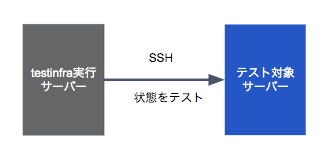
testinfra実行サーバーの状態
- テスト対象サーバーのフィンガープリントは
~/.ssh/known_hostsに登録 ありsshコマンドでは警告なしでログイン可能
~/.ssh/configなし
テストコード
httpd がインストールされていて、バージョンが 2.4 であることをテストするコードです。
def test_httpd_is_installed(host):
    httpd = host.package("httpd")
    assert httpd.is_installed
    assert httpd.version.startswith("2.4")
テスト実行と警告メッセージコマンド
コマンド py.test --hosts=172.16.0.10 -v test_httpd.py で 172.16.0.10 を対象にしてテスト実行します。
$ py.test --hosts=172.16.0.10 -v test_httpd.py
================================================== test session starts ==================================================
platform linux -- Python 3.6.8, pytest-5.3.2, py-1.8.1, pluggy-0.13.1 -- /home/vagrant/a2860/bin/python3.6
cachedir: .pytest_cache
rootdir: /vagrant/testinfra
plugins: testinfra-3.3.0
collected 1 item

test_httpd.py::test_httpd_is_installed[paramiko://172.16.0.10] PASSED                                           [100%]

=================================================== warnings summary ====================================================
test_httpd.py::test_httpd_is_installed[paramiko://172.16.0.10]
  /home/vagrant/a2860/lib64/python3.6/site-packages/paramiko/client.py:837: UserWarning: Unknown ssh-ed25519 host key for 172.16.0.10: b'xxxxxxxxxxxxxxxxxxxxxxxxxxxxxxxx'
    key.get_name(), hostname, hexlify(key.get_fingerprint())

-- Docs: https://docs.pytest.org/en/latest/warnings.html
============================================= 1 passed, 1 warning in 1.20s ==============================================
タイトルにもあるように以下の警告が表示されました。
UserWarning: Unknown ssh-ed25519 host key for 172.16.0.10: b'xxxxxxxxxxxxxxxxxxxxxxxxxxxxxxxx'
原因
テスト対象のフィンガープリントが登録されていないことによる警告です。
前提で記載したとおり、テスト対象サーバーのフィンガープリントは ~/.ssh/known_hostsに登録してあるため、ssh コマンドでは警告なしでログイン可能でした。
にもかかわらず、登録されていない扱いなのは、testinfra のデフォルト Connection backendsが、paramiko(Python製SSHクライアント)であることに起因しているようです。
対処
対処方法1: Connection backends を ssh に変更する
--hosts オプションの指定の仕方で、Connection backends を ssh に変更できます。ssh に変更することで、~/.ssh/known_hosts を参照するため、警告が出ずに実行できます。
テスト実行
$ py.test --hosts=ssh://172.16.0.10 -v test_httpd.py
================================================== test session starts ==================================================
platform linux -- Python 3.6.8, pytest-5.3.2, py-1.8.1, pluggy-0.13.1 -- /home/vagrant/a2860/bin/python3.6
cachedir: .pytest_cache
rootdir: /vagrant/testinfra
plugins: testinfra-3.3.0
collected 1 item

test_httpd.py::test_httpd_is_installed[ssh://172.16.0.10] PASSED                                                [100%]

=================================================== 1 passed in 3.04s ===================================================
警告なしで実行できました。
対処方法2: フィンガープリントのチェックをしない(要注意)
ここまでは、SSH クライアントとしての設定ファイル ~/.ssh/config は用意しませんでした。
この設定ファイルに、フィンガープリントのチェックをしないように定義しておくと、paramiko で接続詞ても警告が出ずに実行できます。
ただし、セキュリティ上のリスクを増やす設定になるので、限定的な使用にとどめておくことをおすすめします。
- ~/.ssh/config
host 172.16.0.10
  StrictHostKeyChecking no
テスト実行
$ py.test --hosts=172.16.0.10 -v test_httpd.py
================================================== test session starts ==================================================
platform linux -- Python 3.6.8, pytest-5.3.2, py-1.8.1, pluggy-0.13.1 -- /home/vagrant/a2860/bin/python3.6
cachedir: .pytest_cache
rootdir: /vagrant/testinfra
plugins: testinfra-3.3.0
collected 1 item

test_httpd.py::test_httpd_is_installed[paramiko://172.16.0.10] PASSED                                           [100%]

=================================================== 1 passed in 1.08s ===================================================
警告なしで実行できました。
もし、SSH クライアント設定ファイルを ~/.ssh/config 以外のファイル名にしたば場合は、py.test コマンドの --ssh-config オプションで指定します。
おわりに
正直、paramiko は ~/.ssh/known_hosts を参照する挙動だと思っていたので、少しはまりました。
もしかしたら、testinfra の設定やテストコードの工夫次第で参照できるようになるかもしれません。
