
はじめに
2024/09/30 に、AAP (Ansible Automation Platform) 2.5 がリリースされました。
- Unlock your Automation Advantage with Red Hat Ansible Automation Platform 2.5
- What’s new in Red Hat Ansible Automation Platform 2.5 | Red Hat Developer
今回は個人的に注目している変更点は以下の2つです。
- 統合UI「Platform Gateway」の導入
- コンテナによるデプロイ方式の追加
本記事では 1 に関連して、Platform Gateway がどういうものか、Automation Controller とはどういう関係かなど、調べてみたことをまとめます。
はじめに自分なりの言葉でまとめておきます。
- Platform Gateway は、Automation Controller や Automation Hub を束ねる UI を備えるプロダクト
- GUI や API のアクセス先も Platform Gateway 経由が基本になる
(なお、2 のコンテナ版については AAP 2.4 時点で Technical Preview でした。詳細はこちらの記事をご参照下さい)
前提環境
- インストーラー: Ansible Automation Platform 2.5 Containerized Setup Bundle
ansible-automation-platform-containerized-setup-bundle-2.5-2-x86_64.tar.gz最終更新日 2024-10-08
- デプロイ方式: コンテナ(RPM では本記事の内容と異なる点もあります)
- Red Hat Enterprise Linux 9.4、ホスト名設定済み、サブスクリプション登録済み
用語整理: Unified UI = Platform Gateway
公式ブログでは、Platform Gateway という言葉は登場せず Unified UI と表現されていますが、リリースノートを見る限り、Unified UI = Platform Gateway とみなして問題なさそうです。
「What is included in the Ansible Automation Platform」という表にも「Platform Gateway(Unified UI)」とあります。
また、 コンテナ名や、インストーラーが利用するインベントリファイルのグループ名としては、Platform Gateway ではなく、automation-gateway や automationgateway のような言葉で表現されます。
Platform Gateway の概要
日本語版のリリースノートを引用します。
Ansible Automation Platform 2.5 では、Ansible Automation Platform の認証と認可を処理するサービスとしてプラットフォームゲートウェイが提供されます。プラットフォームゲートウェイを使用すると、Ansible Automation Platform を設定するすべてのサービスが 1 つの統合 UI に統合されます。統合された UI は、Ansible Automation Platform への単一のエントリーを提供し、単一の場所からすべての Ansible Automation Platform サービスに認証およびアクセスするためのプラットフォームユーザーインターフェイスとして機能します。
「AAP = Automation Controller (旧 Ansible Tower)」のイメージが強いかもしれませんが、実際は、複数のプロダクトやサービス群を指す総称です。実際は、Automation Controller 以外にも、自前でデプロイするプロダクトだけでも Private Automation Hub、EDA Controller があります。
これまで、それぞれ別々の管理画面でしたが、これらが Platform Gateway の画面経由で操作できるようになります。それぞれの画面をあちこちブラウザのタブを回っていた方には便利に感じるのではないでしょうか。
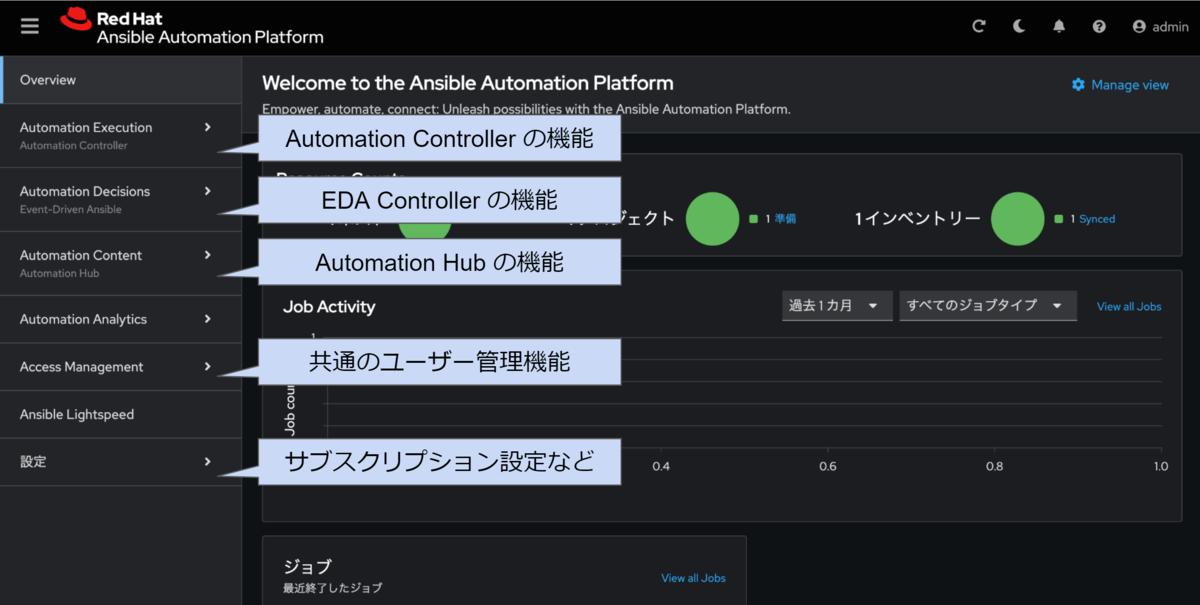
メニュー構成
左のメニューと機能の大まかな対応は以下の通りです。リリースノートの「Terminology changes」にもまとめがあります。
| メニュー名称 | 対応プロダクト | 役割 |
|---|---|---|
| Automation execution | Automation Controller | Playbook を動かす |
| Automation decision | Event-Driven Ansible controller | イベント駆動の Ansible |
| Automation content | (Private) Automation Hub | コレクションやEEを管理 |
インストールしなかったプロダクトに対応するメニューは非表示になります。たとえば、Event-Driven Ansible controller をインストールしなければ左のメニューに「Automation decision」は表示されません。
Platform Gateway から見ると各プロダクトを「機能」として扱うようなイメージでしょうか。
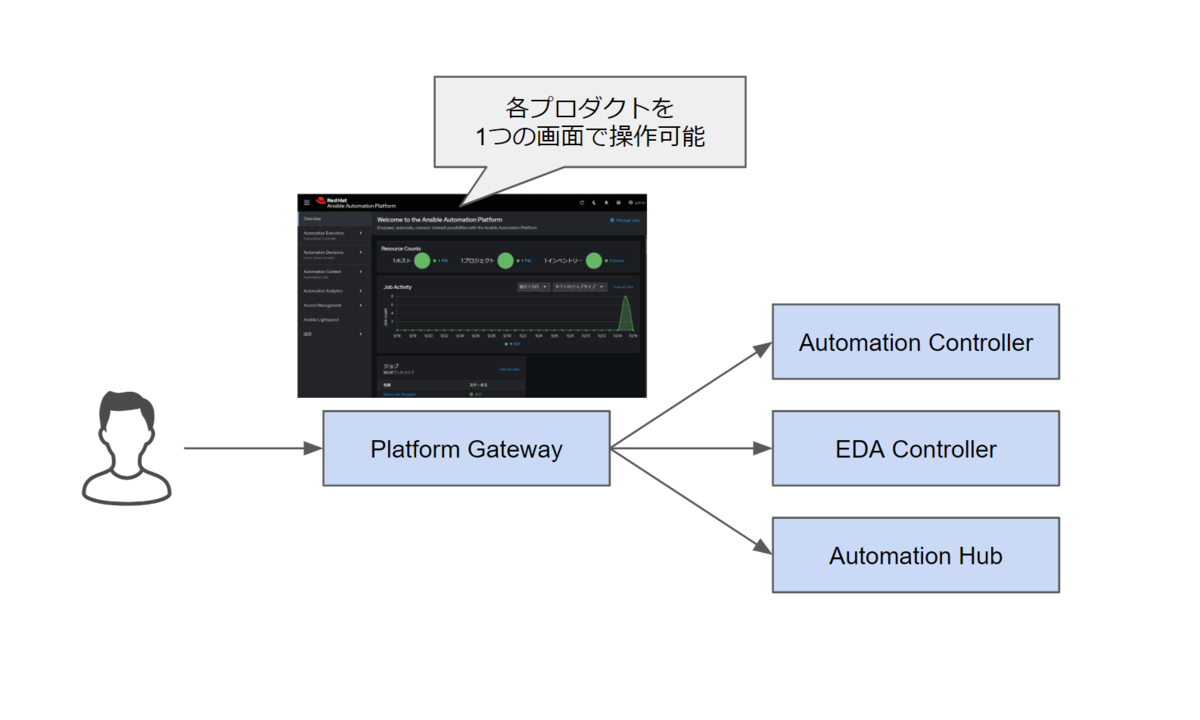
バックエンド
この記事では、Platform Gateway 裏で動くプロダクトのことをバックエンドと呼ぶことにします(それらしい設定画面に backend という文言があったので)。
詳細を追い切れていませんが、Platform Gateway の service や route と呼ばれる設定によってバックエンドへの中継処理を実現している雰囲気でした。ただ、インストーラーの処理を追ったり、Platform Gateway の API を少し触った上での勘でしかありません。Platform Gateway 自身のドキュメントがあれば確認したいです。
https://ゲートウェイ/api/gateway/v1/status/ をGETすると、以下のようなレスポンスが返ってきます。Platform Gateway が束ねている雰囲気が感じ取れます。
{
    "time": "2024-10-16T01:43:14.370615",
    "status": "good",
    "services": {
        "gateway": {
            "status": "good",
            "nodes": {
                "aap25c.sakana.local:8446": {
                    "url": "https://aap25c.sakana.local:8446/api/gateway/v1/ping/",
                    "status": "good",
                    "response": {
                        "version": "2.5",
                        "pong": "2024-10-16 01:43:14.438878",
                        "status": "good",
                        "db_connected": true,
                        "proxy_connected": true
                    }
                }
            }
        },
        "controller": {
            "status": "good",
            "nodes": {
                "aap25c.sakana.local:8443": {
                    "url": "https://aap25c.sakana.local:8443/api/v2/ping/",
                    "status": "good",
                    "response": {
                        "ha": false,
                        "version": "4.6.1",
                        "active_node": "aap25c.sakana.local",
                        "install_uuid": "8a8b171f-cdba-403c-b203-4365e07896b1",
                        "instances": [
                            {
                                "node": "aap25c.sakana.local",
                                "node_type": "hybrid",
                                "uuid": "65884d56-0636-8b8d-4343-eb43413873ac",
                                "heartbeat": "2024-10-16T01:43:11.436555Z",
                                "capacity": 136,
                                "version": "4.6.1"
                            }
                        ],
                        "instance_groups": [
                            {
                                "name": "controlplane",
                                "capacity": 136,
                                "instances": [
                                    "aap25c.sakana.local"
                                ]
                            },
                            {
                                "name": "default",
                                "capacity": 136,
                                "instances": [
                                    "aap25c.sakana.local"
                                ]
                            }
                        ]
                    }
                }
            }
        },
        //略
画面の操作例
以下、イメージをつかむために Platform Gateway のいくつかの操作例をまとめます。
操作例1: ジョブテンプレートの実行
Platform Gateway 経由で、Automation Controller の機能であるジョブテンプレートを実行する場合は以下のような操作です。
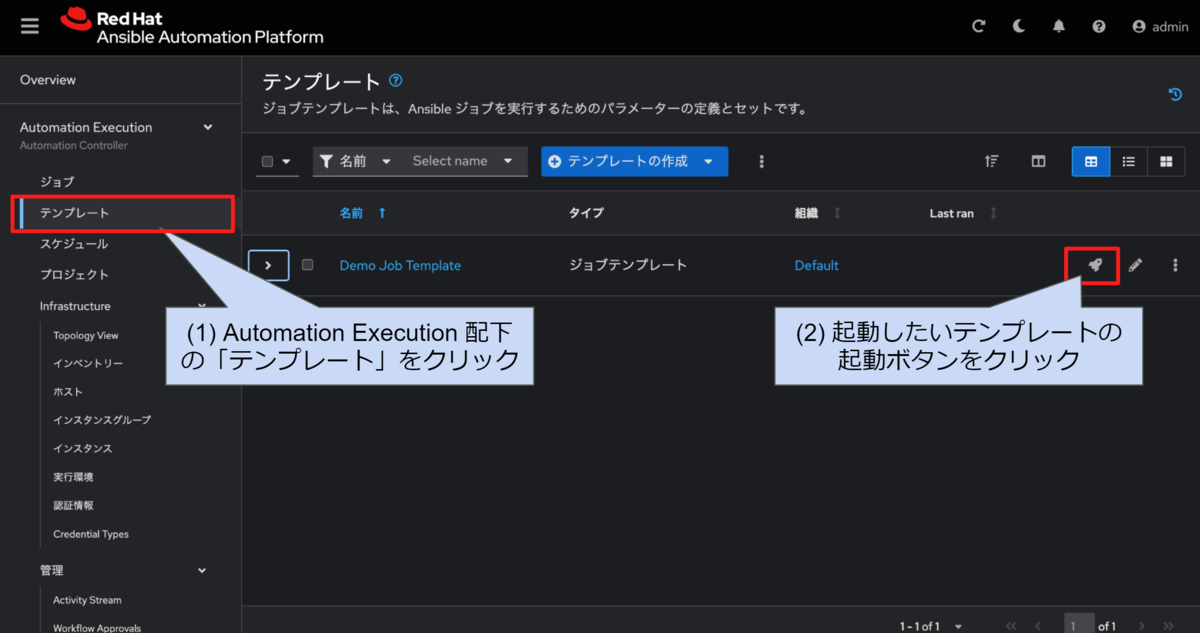
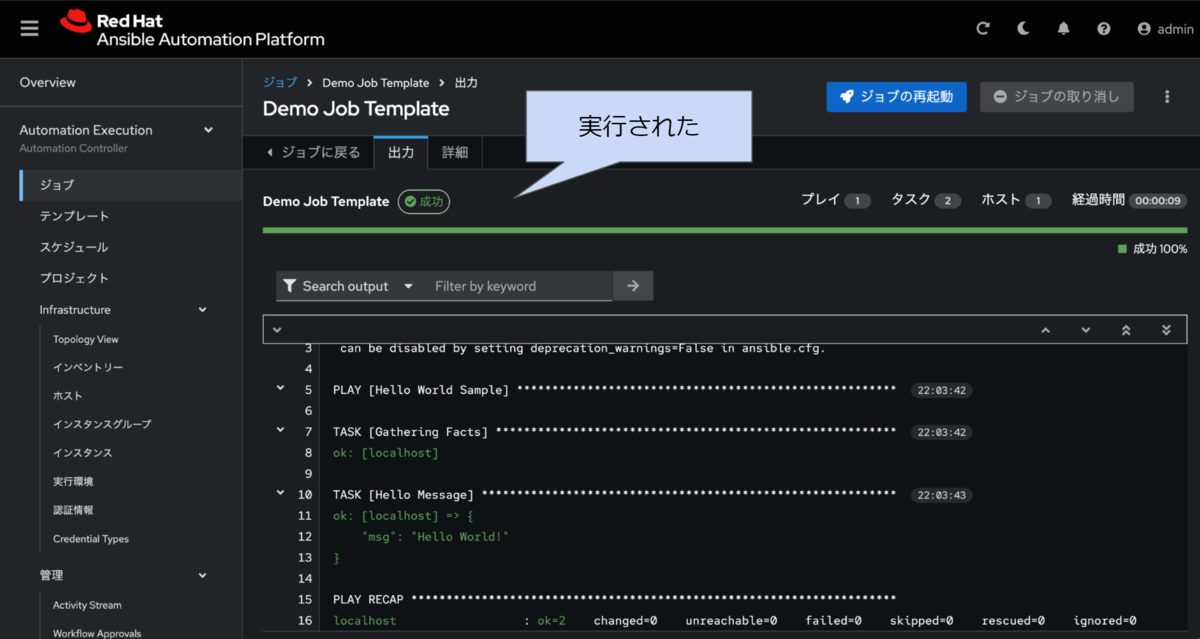
「Automation Execution」からたどれば良い点だけおさえておけば、特に迷う点はないかなと思います。
全面的に UI が刷新されていますね。Automation Controller 4.5 では Technical Preview 扱いで新しい UI がありましたが、あれの流れでしょうか。
操作例2: ユーザー管理
ユーザーやチームも Platform Gateway 側で管理します。
各機能(プロダクト)のメニュー配下ではなく「Access Management」から操作します。メニューの構成からも共通各機能共通であることが感じ取れます。
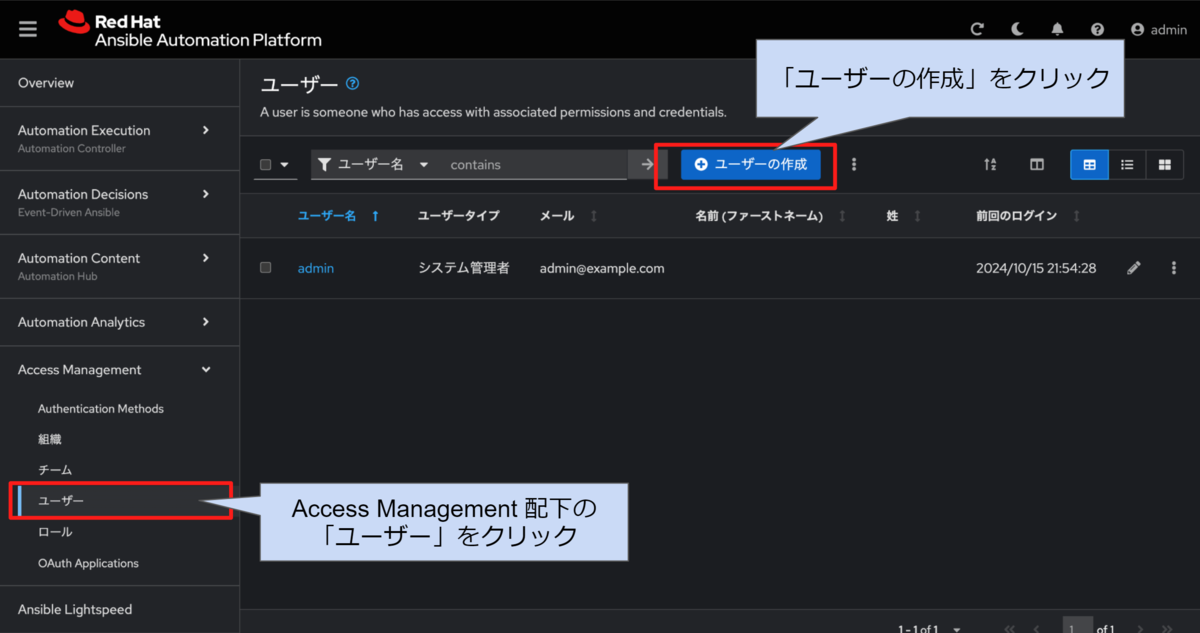
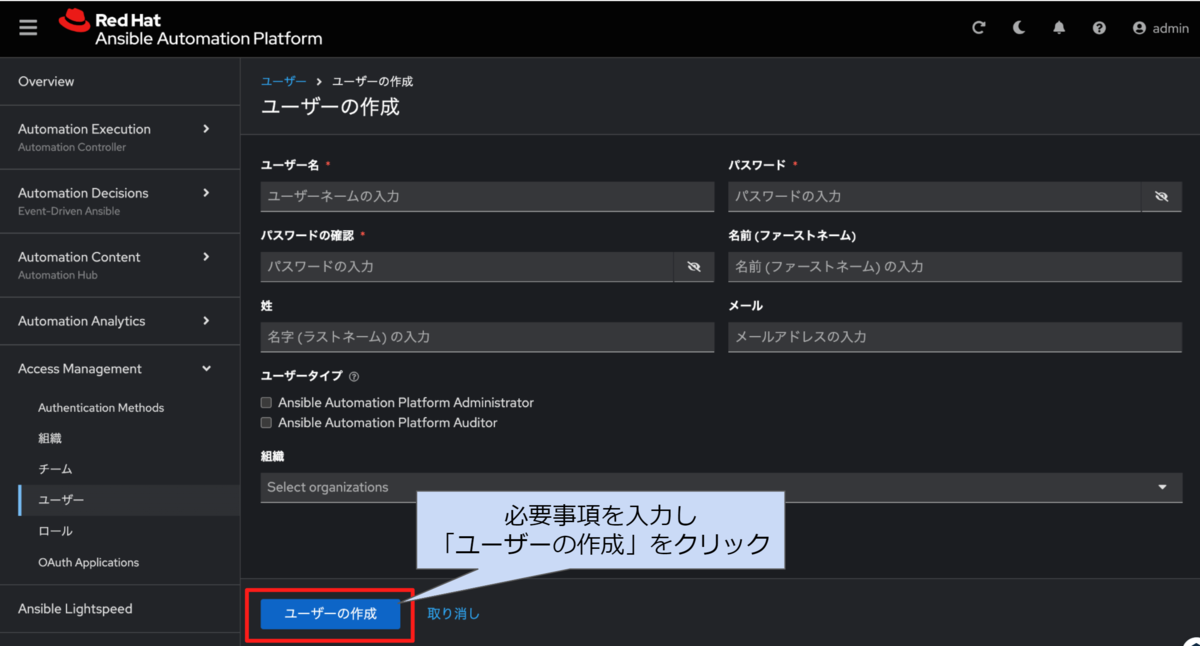
LDAP のような外部認証ではなく、ローカル認証を利用していた場合でも認証情報を一括管理できるのはよさそうです。
操作例3: Host Metrics の確認
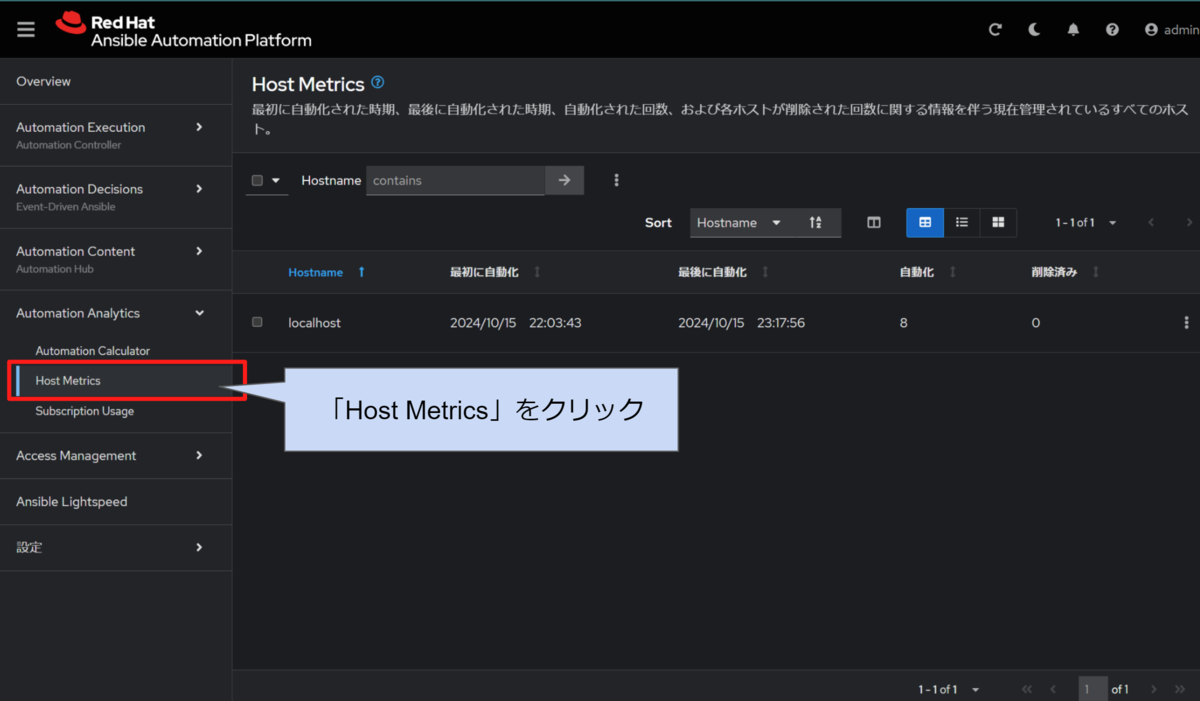
これまで Automation Controller の左メニューの上の方にあった「ホストメトリックス」は「Automation Analytics」配下になりました。
自動化されたホストの数を把握することは、適切なライセンス運用をする上で重要なので、引き続きこの画面は見る機会があると思います。
操作例4: バージョン確認
右上の「?」をクリックして「情報」をクリックすると、インストールしたプロダクトのバージョンが表示されます。
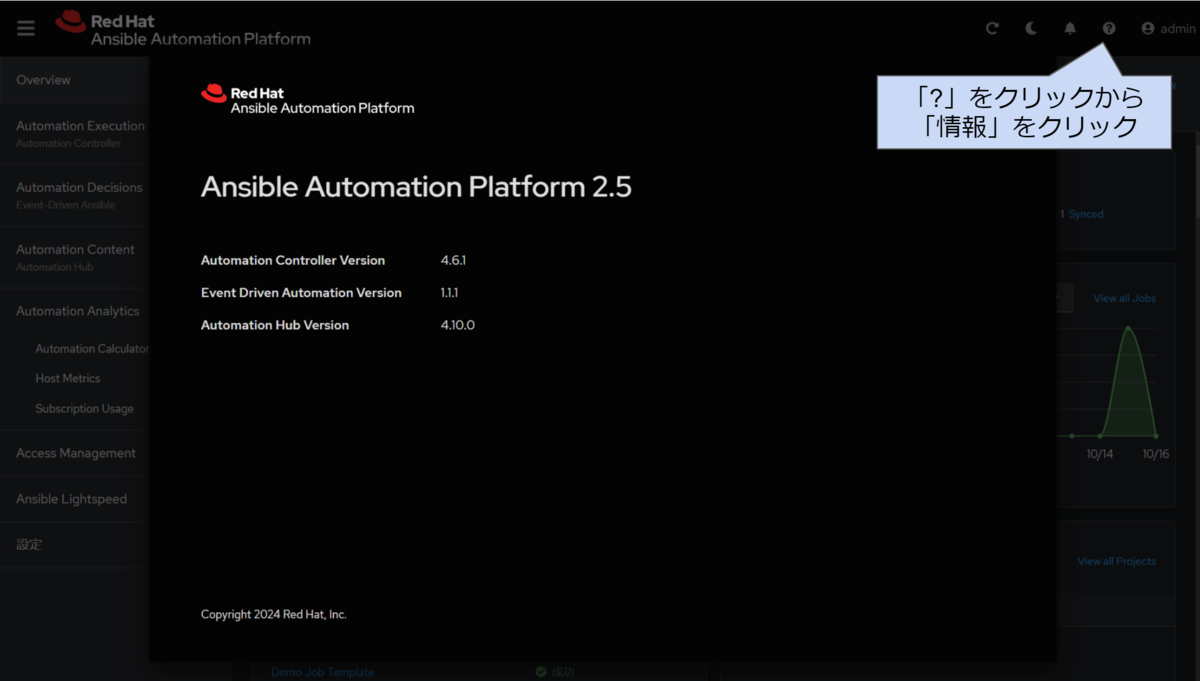
ただ、Platform Gateway 自身のバージョンが表示されませんね。
今回の環境では、https://ゲートウェイ/api/gateway/v1/ping/ を GET すると、レスポンスヘッダに X-API-Product-Version: 2.5.0.dev1 とあったり、以下のボディがあったりしました。なので、2.5 ということなのかなと思います。AAP としてのバージョンのことなのか、Platform Gateway としてのバージョンなのか、両者を合わせているから同じに見えるのか、厳密には不明です。
{
    "version": "2.5",
    "pong": "2024-10-16 01:47:01.718247",
    "status": "good",
    "db_connected": true,
    "proxy_connected": true
}
[2025/03/26 追記] どこかのタイミングで、X-API-Product-Version: 2.5.20241218 のようにパッチリリース日らしき値が含まれるようになりました。
各種インターフェースの変化
Platform Gateway が導入されることによって起こる GUI や API の仕様の変化についてです。
GUI は Platform Gateway 側に統合
GUI は前述の通り、Platform Gateway 側に統合されます。
そのため、ユーザーは https://コントローラー:8443/ ではなく https://ゲートウェイ/ にアクセスして操作することになります。
いままで(AAP 2.4 / Automation Controller 4.5まで)通り、Automation Controller の画面を直接開いても、真っ白になりました。試す限り、どこにもリダイレクトされず Content-Length: 0 のレベルでした。以前の Automation Controller の画面を表示させる方法があるのかもしれませんが、ないものだと思ってよさそうです。
[2024/10/30 追記] 2024/10/28 のリリースでは Platform Gateway へのリダイレクトされるようになったようです(リリースノート)。
The automation controller, Event-Driven Ansible, and automation hub legacy UIs now display a redirect page to the Platform UI rather than a blank page.
API も基本的に Platform Gateway 側に統合
API も同様に、Platform Gateway 側に統合されます。
これまで、Automation Controller への API エンドポイントのベースは https://コントローラー/api/v2/ でした。
これが 、Platform Gateway 経由でのアクセスになることによって、https://ゲートウェイ/api/controller/v2/ になります。Automation Controller への操作であれば、パスに controller が含まれる点が特徴です。
Automation Controller への直接の API リクエストもまだ使えることは使えるようです。この点は GUI の事情と異なります。たとえば、https://コントローラー:8443/api/controller/v2/ や https://コントローラー:8443/api/v2/ (パスが今まで通り)です。
まとめると、Automation Controller への API アクセスは以下の 3通りが考えられます。
https://ゲートウェイ/api/controller/v2/https://コントローラー:8443/api/v2/https://コントローラー:8443/api/controller/v2/
うまく表現できている自信がありませんが、以下の図のような関係です。
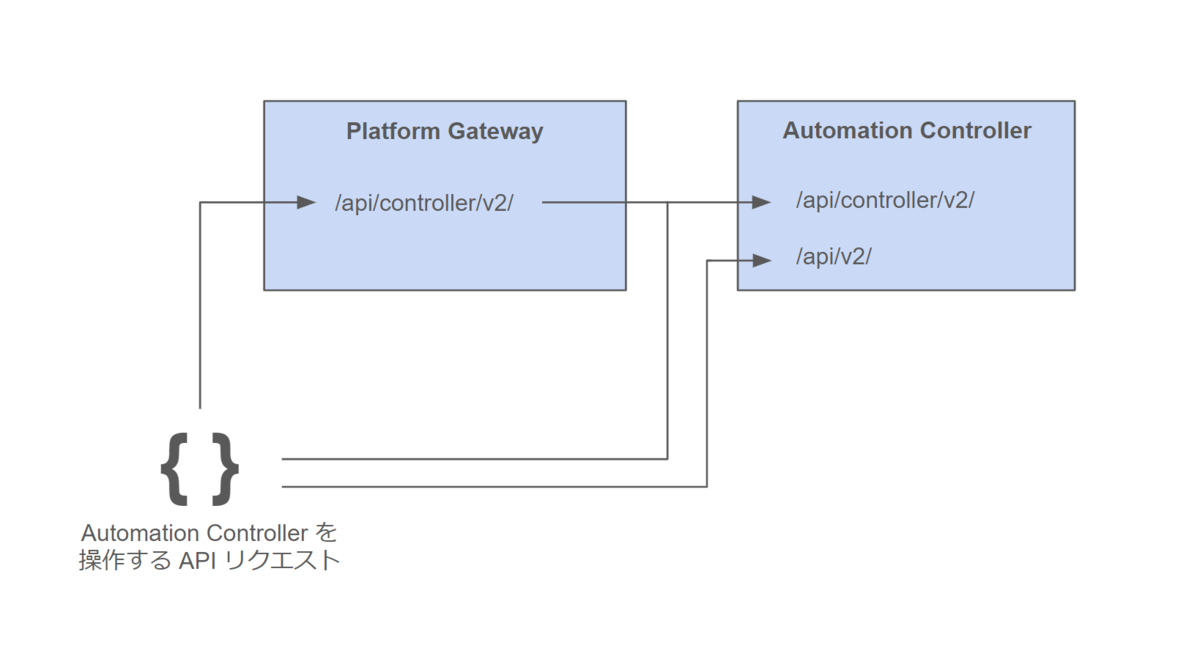
(図には含めていませんが Platform Gateway 自身を操作する API エンドポイントのベースは https://ゲートウェイ/api/gateway/v1/) です)
Automation Controller 側の /api/v2/users/ 等のユーザー管理エンドポイントは Platform Gateway 側へ移行)したとあります。ユーザー管理は、Platform Gateway 側で行うものであり、各 API へのアクセスも Platform Gateway を経由(https://ゲートウェイ/api/controller/v2/)するのが一番 AAP 2.5 らしいお作法なのでしょう。
なお、Automation Controller 側の API パスが controller ありでもなしでもアクセスできるようになっているのは、コンテナ automation-controller-web の /etc/tower/settings.py の設定 OPTIONAL_API_URLPATTERN_PREFIX によるもののようでした。コメントには Platform Gateway 向けの設定であることが記載されています。
# Update URL prefix when gateway deployed so internal links work correctly
OPTIONAL_API_URLPATTERN_PREFIX = "controller"
Automation Controller への操作を Ansible で自動化する ansible.controller コレクション 4.6.0 では、 Automation Controller へのアクセスは /api/controller/v2/ に変更されているようです。
なお、公式ブログの記事では、
Services API will still be available but will eventually be deprecated later in 2.5.
とあります。「Services API 」が何を指すのかわからないのですが、もしかしたら Automation Controller でいうと /api/v2/ のことなのかもしれません。
インストール
インストール手順のドキュメントをベースにしてインストールします。
ここから先は、バックエンドは Automation Controller に絞ったパターンを前程にします。
準備
ホスト名、サブスクリプション登録をすませ、インストール(やトラブルシューティング)に必要なパッケージをインストールします。
$ sudo dnf install -y wget git-core rsync vim
インストーラーの配置
予めダウンロードしておいたインストーラーの tar.gz を作業マシン(今回はインストール先も兼ねる)にコピーします。
回答後、ディレクトリを移動します。
$ tar xzf ansible-automation-platform-containerized-setup-bundle-2.5-2-x86_64.tar.gz
$ cd ansible-automation-platform-containerized-setup-bundle-2.5-2-x86_64
インベントリファイルの準備
AAP のインストールの詳細の指定には、従来通りインベントリファイルを使用します。
本記事では(RPM版ではなく)コンテナ版を扱います。1つのホストに対してすべてのコンテナをデプロイする、シンプルなインベントリファイルは以下の通りです。ファイル名は inventory とします。
[automationgateway]
aap25c.sakana.local ansible_connection=local

[automationcontroller]
aap25c.sakana.local

[database]
aap25c.sakana.local

[all:vars]
postgresql_admin_username=postgres
postgresql_admin_password=<DB の admin パスワード>

bundle_install=true
bundle_dir=<バンドル版に含まれるコンテナイメージのimagesディレクトリがあるディレクトリ(フルパス)>

controller_license_file=<マニフェストファイルのパス>

redis_mode=standalone

gateway_admin_password=<Platform Gateway の admin パスワード>
gateway_pg_host=aap25c.sakana.local
gateway_pg_password=<Platform Gateway の DB パスワード>

controller_admin_password=<Automation Controller の admin パスワード>
controller_pg_host=aap25c.sakana.local
controller_pg_password=<Automation Controller の DB パスワード>
aap25c.sakana.local は、作業マシン兼インストール先で、名前解決できるようにしています。aap25c のような単一ラベルのホスト名ではエラーになってしまいます(詳細は別の記事)。また、controller_license_file の指定は任意ですが、マニフェストファイルを指定しておくと、インストール処理の中でライセンスまで適用されます。
あとは、インストールの Playbook を実行するだけです。これにより、podman のインストールや、各コンテナのデプロイなどのインストール処理が行われます。
$ ansible-playbook -i inventory ansible.containerized_installer.install
なお、インストールの処理上 Platform Gateway の構築は必須です。試しに automationgateway グループ に所属するホストを空にしたら、You must have a host set in the [automationgateway] section というエラーが発生しました。
補足: 再インストール時は一度アンインストールする方が吉
インベントリファイルの、インベントリホスト名やポート番号を変更して、再度インストールのPlaybookを実行すると、解せないエラーが発生してしまうことがありました。
そのため、このようなインパクトの大きめな変更をする場合は、一度アンインストールの Plyaobook を実行してから、再度インストールの Playbook を実行するようが良いと思いました。
[2025/03/31 追記]
Red Hat 社の ナレッジベースに コンテナ版 AAP のインストール方法が紹介されていました。
Platform Gateway を構成するコンテナと待ち受けポート
「Platform Gateway」と一言で言っても、2 つのコンテナで構成されます。
| コンテナ名 | 役割 |
|---|---|
automation-gateway-proxy |
ブラウザのトラフィックの受け口。Envoy が動作していて、本体に流す |
automation-gateway |
Platform Gateway 本体 |
バックエンドの Automation Controller を合わせると以下のような図になります。ポート番号はデフォルトの場合です。
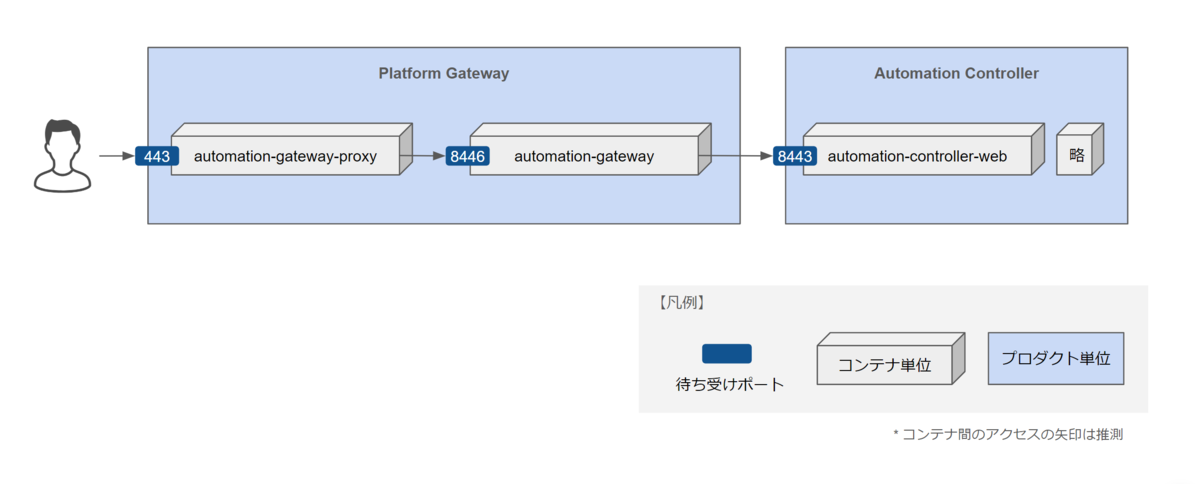
コンテナ間のアクセスを示す線は少し自信がないのですが、少なくとも Platform Gateway でジョブテンプレートを実行する操作は ブラウザから Automation Controller へのアクセスはありませんでした。
待ち受けポートは、インストールに利用するインベントリファイル等の変数の指定で変更できます。
| 変数名 | 役割 | デフォルト | 補足 |
|---|---|---|---|
envoy_https_port |
Envoy (Platform Gateway の入り口) の HTTPS 待ち受けポート | 443 |
注)ansible.containerized_installer.automationgateway ロール内の defaults/main にデフォルトの定義があります。ドキュメントの変数一覧には掲載はなく、試したら変更できたという程度で原理を追いきれていません。あまり変更されることを想定していないのかもしれません。[2024/10/18追記] 一部のドキュメントにはこの変数の利用に修正されました |
gateway_nginx_https_port |
Platform Gateway 本体の HTTPS 待ち受けポート | 8446 |
ドキュメントの変数一覧には掲載がないですが、インストーラーtar.gz解凍ディレクトリ/collections/ansible_collections/ansible/containerized_installer/README.md に記載があります |
controller_nginx_https_port |
Automation Controller の HTTPS 待ち受けポート | 8443 |
なお、「はじめに」に書いた通り本記事はコンテナ版でのインストールを前提にしています。PRM 版でのインストールの場合、デフォルトの待ち受けポートなのでご注意ください。
Envoy の挙動
※ 正直、Envoy はこれまで名前を聞いたことがある程度でした。なので Envoy の話はあいまいな理解が含まれます。なにか誤りなどあればお手数ですが @akira6592 までお知らせいただけると幸いです。
コンテナ automation-gateway-proxy 内の Envoy は以下のコンフィグで動きます。( /etc/envoy/envoy.yaml にコメントを追記)
node:
  id: aap25c.sakana.local
  cluster: envoy

dynamic_resources:
  cds_config:
    resource_api_version: V3
    api_config_source:
      api_type: REST
      transport_api_version: V3
      cluster_names:
        - gateway-control-plane-rest
      refresh_delay:
        seconds: 5

  lds_config:
    resource_api_version: V3
    api_config_source:
      api_type: REST
      transport_api_version: V3
      cluster_names:
        - gateway-control-plane-rest
      refresh_delay:
        seconds: 5

static_resources:
  clusters:
  - type: STRICT_DNS
    typed_extension_protocol_options:
      envoy.extensions.upstreams.http.v3.HttpProtocolOptions:
        "@type": type.googleapis.com/envoy.extensions.upstreams.http.v3.HttpProtocolOptions
        explicit_http_config:
          http_protocol_options: {}
    name: gateway-control-plane-rest
    load_assignment:
      cluster_name: gateway-control-plane-rest
      endpoints:
      - lb_endpoints:
        - endpoint:
            address:
              socket_address:
                address: aap25c.sakana.local    # Platform Gateway 本体のアドレス(デフォルトではインベントリホスト名)
                port_value: 8446                # Platform Gateway 本体のポート(デフォルト 8446)
    transport_socket:
      name: envoy.transport_sockets.tls
      typed_config:
        "@type": type.googleapis.com/envoy.extensions.transport_sockets.tls.v3.UpstreamTlsContext

  - type: STRICT_DNS
    typed_extension_protocol_options:
      envoy.extensions.upstreams.http.v3.HttpProtocolOptions:
        "@type": type.googleapis.com/envoy.extensions.upstreams.http.v3.HttpProtocolOptions
        explicit_http_config:
          http2_protocol_options: {}
    name: gateway_control_plane
    load_assignment:
      cluster_name: gateway_control_plane
      endpoints:
      - lb_endpoints:
        - endpoint:
            address:
              socket_address:
                address: 127.0.0.1
                port_value: 50051
Envoy から Platform Gateway に対して POST でリクエストが出されていました。
https://ゲートウェイ:8446/v3/discovery:listeners
Platform Gateway からは以下のようなレスポンスを返します。レスポンスにポート番号 443 が含まれます。
{
    "resources": [
        {
            "@type": "type.googleapis.com/envoy.config.listener.v3.Listener",
            "name": "port-443",
            "address": {
                "socketAddress": {
                    "address": "0.0.0.0",
                    "portValue": 443
                }
            },
          // 略
この結果、Platform Gateway 本体の代わりに Envoy が 443 で待ち受けるようです。
ちょっと自信がないので、別途 Envoy については調べようと思います。
まとめ
まとめ(再掲含む)
- Platform Gateway は、Automation Controller や Auhtomation Hub を束ねる UI を備えるプロダクト
- ユーザーや、システム連携 API のアクセス先も Platform Gateway 経由が基本になる
- Platform Gateway は
automation-gateway-proxyとautomation-gatewayという 2つのコンテナで構成される automation-gateway-proxyで Envoy が動作し、ユーザーのトラフィックをデフォルト 443/TCP で待ち受ける
AAP 内の複数のプロダクトを利用した場合は、統合 UI が提供されるのは便利になると思います。
一方で、もともと Automation Controller しか使っていなかった場合から比較すると、少々ファットになった印象です。逆に、これを機会に他のプロダクトも活用する後押しにはなりそうです。
参考
AAP 2.5 ドキュメント一式
Red Hat Ansible Automation Platform | Red Hat Product Documentation
